- Rackmount Cabinets & Frames Parts
- sku: 3094707900328622
- DELL 520-884-501
520-884-501 DELL Kmm Rack Mount Led Kvm Console
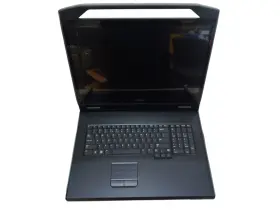
| Brand | DELL |
|---|---|
| Manufacturer Part Number | 520-884-501 |
| Type | KVM CONSOLE |
| Unit Type | UNIT |
| Manufacturer Warranty | NO |
| Country/region Of Manufacture | UNITED STATES |
| Rack Unit Height | 1 U |
| California Prop 65 Warning | THIS PRODUCT CONTAINS THE STATE OF CALIFORNIA. |
Review DELL Kmm 1u Rack Mount 18.5in Led Kvm Console Tested Working
Introducing the Dell 520-884-510 KMM FPM185, a 1U rack mount 18.5-inch LED KVM console that delivers an efficient and convenient solution for managing multiple servers or systems within a data center environment. This KVM console is designed to provide users with a space-saving, easy-to-use, and cost-effective way to access and control multiple systems from a single console.
The KVM console features a 18.5-inch LED monitor with a resolution of 1366 x 768 pixels, providing clear and sharp visuals for system management tasks. The monitor is also equipped with a brightness adjustment feature, allowing users to optimize the display settings according to their preferences and lighting conditions.
The console also comes with a built-in KVM switch, which supports up to 16 servers or systems. The switch allows users to seamlessly switch between connected systems with the press of a button, eliminating the need to physically connect and disconnect cables. The switch also supports hot-key switching, enabling users to quickly access specific systems using predefined hot keys.
The KVM console includes a full-size, 15-key numeric keypad and a set of multimedia function keys, providing users with a comfortable and functional typing experience. The console also supports USB 2.0 passthrough, allowing users to connect peripherals directly to the console for use with their systems.
The console's 1U form factor and compact design make it an ideal solution for data center environments where space is at a premium. The KVM console is also rack mountable, allowing it to be easily integrated into standard 19-inch racks. The console's front panel is tool-less, making it easy to install and remove from the rack.
The Dell 520-884-510 KMM FPM185 is designed to meet the demands of mission-critical environments, with features such as redundant power supplies and a robust construction. The console also supports remote management capabilities, enabling users to monitor and manage the console remotely using Dell OpenManage Essentials or other third-party management tools.
In summary, the Dell 520-884-510 KMM FPM185 is a versatile and powerful 1U rack mount KVM console that provides an efficient and convenient solution for managing multiple systems in a data center environment. With its 18.5-inch LED monitor, built-in KVM switch, full-size keyboard, and USB 2.0 passthrough, this console offers users a functional and user-friendly experience for system management tasks. The console's compact design, space-saving form factor, and robust construction make it an ideal choice for data center environments where space and performance are critical.
The Dell KVM (Keyboard-Video-Mouse) switch model 520-884-501 KMM FPM185 is a 1U rack mount KVM console that allows users to switch between multiple computers connected to it with a single set of peripherals. Here are some potential pros and cons of buying this Dell KVM switch:
Pros:1. Space-saving design: The 1U rack mount form factor saves valuable rack space and simplifies cable management.
2. Supports multiple computers: The ability to connect and switch between multiple computers using a single set of peripherals can help reduce clutter and improve ergonomics.
3. LED display: The integrated LED display shows system status and selected computer information, making it easy to identify which system is active.
4. Hot-key support: The KVM switch includes hot keys for quick access to system functions and for switching between connected computers.
5. Power management: The KVM switch can power cycle and turn on/off connected computers, which can help save energy and reduce power consumption.
Cons:1. Cost: The Dell KVM switch is more expensive than some other KVM switches on the market.
2. Limited number of ports: This particular model only supports up to four computers, which may not be sufficient for larger environments.
3. Requires a rack mount: The 1U rack mount design may not be suitable for all environments or applications.
Conclusion:The Dell KVM switch model 520-884-501 KMM FPM185 offers several benefits, including space savings, support for multiple computers, an integrated LED display, hot-key support, and power management. However, it also has some drawbacks, such as a higher cost and limited number of ports. Ultimately, the decision to buy this KVM switch will depend on your specific needs, budget, and environment. If you require a space-saving solution for managing multiple computers with a single set of peripherals, this Dell KVM switch may be a good investment. However, if you have a larger number of computers to manage or a limited budget, you may want to consider other options.
Recommendation:If the Dell KVM switch model 520-884-501 KMM FPM185 meets your requirements and budget, it is a solid choice for managing multiple computers in a rack-mount environment. However, if you require more ports, consider the Dell KVM switch model KMM3100 or other models from other manufacturers that may offer a better balance of features and cost. Additionally, consider other alternatives such as USB KVM switches or KVM over IP solutions if a rack-mount design is not necessary for your use case.
Details:
Sale includes only items pictured. This is backed by our 30 day money back guarantee. Sale includes: Dell kmm FPM185 1u rack mount 18.5in led kvm console. Used - tested working in great condition.
Please view each of the pictures to get a better idea condition specifics. 5 star service is our number one priority.
specifications rackmountcab:
- brand: Dell
- mpn: 520-884-501
- type: Kvm Console
- unit type: Unit
- manufacturer warranty: No
- country/region of manufacture: United States
- rack unit height: 1 U
- california prop 65 warning: This Product Contains The State Of California.
returns rackmountcab:
- method: money back
- policy: returns accepted
- paid by: seller
- time: 30 days
payments rackmountcab:
- other
- wallet: google-pay
- credit card: discover
offer rackmountcab:
- in stock #: 5
- started: june 19, 2025
- availability: in stock
- options: ship-to-home
- sold #: 21
- prices: $149.96–$800.00
- item condition:
- Used
- Open box
- New
- best offers: true
shipping rackmountcab:
- type: fixed
- carrier: ups
- transit: 6-10 days
- class: standard, economy
- service: standard, ups ground saver
general rackmountcab:
- category: Computers > Enterprise Networking, Servers > Racks, Chassis Patch Panels > Rackmount Cabinets Frames
seller rackmountcab:
- # reviews: 69891
- city: auburn, washington
- rating: 98.0%
Similar Items:
- Apc E242296 18 7 8in 19 Inch 42he Dell Emc Server Network Cabinet Incl Rack Display APC net shelter SC 42U 600MM wide x 1200MM deep enclosure with sides black AR3300X717: Dell ecm server network cabinet incl rack display AR3300X717...(January 25th, 2024)
- Dell 0t068c Poweredge T610 T710 Rack Mounting Rails Dpn 0n707c N707c T068c Products with missing, damaged, altered, or otherwise unreadable serial number label, manufacturer model part and/or warranty label. It has been cleaned and successfully passed our power-on tests. Problems caused by third party software. A return initiated for a DOA product that powers on and works ...(February 7th, 2024)
- Dell Pe4210 Poweredge Rack Enclosure 4210 42u Black Rotating rear casters to easily position rack. All Dell and third party rack mount equipment compliant to the IA 310- e standard. Dell power edge 4210 series 42U. Dual rear doors with lock same key as front door. U space numerical markings on both front and rear mounting posts. Black with aluminum ...(February 10th, 2024)
- Dell Ar3300 Apc Netshelter Sx 42u Server Rack Cabinet With Side Panels And Key APC AR3300 net shelter SC 42U server rack cabinet w/ side panels key, technical specifications: brand: APC, model: AR3350, type: enclosure, unit: 42U, width : 19, attribute: 1991 H x 600W 1200DMM, color: black, inclusion:- panels, - key. Fast shipping. Our relationship allows for access to source ...(February 24th, 2024)
- Dell 100-561-078 Emc 42u Networking Server Storage Rack Cabinet 6ft T-rack1 This unit comes with 220V puds and keys for the back door...(March 6th, 2024)
- Dell 0gj575 42u Rack Complete With Key Freigth Or Local Pick Up All consumables such as ink cartridges sealed ,batteries, accessories keyboard and mice etc. Tested for key functions, R2/READY resale. Are not covered under the standard warranty...(March 21st, 2024)
- Dell Oc745r 1u Fixed Server Rack Enclosure Cabinet Shelf Black Condition is used. OC745R Dell 1u fixed server rack enclosure cabinet shelf black. Shipped with USPS ground advantage...(April 11th, 2024)
- Dell K839c Poweredge R310 R610 Sliding Rack Mount Rail Kit 0k839c 0n705c 0-HOURS on hard drives means the are never installed/used in a system and is brand new with no hour usage them. Item condition new others means item pulled from brand new system and does not have original manufacturer packaging material. Item condition refurbished means we pull the parts from ...(April 12th, 2024)
- Dell N1m4k 2u Rack Cable Arm Poweredge R550 R750 R750xa 4z All product is carefully packaged to ensure safe delivery of your. Quantity discounts available. Hardware support, including components such as hard drives, memory, motherboard, and more. Vibrant technologies focuses on enterprise it hardware sales. Free shipping, if offered, is valid for the ...(May 29th, 2024)
- Dell 68fr0 5u Sliding Rack Rail Kit For 1070mm Racks 4z This item is most likely not compatible with a PC, laptop, tablet or other consumer electronics device. How does the process function. All customized servers, storage devices, and networking gear come with a 1-YEAR or 3-YEAR vibrant certified maintenance plan. Hardware support, including components ...(May 29th, 2024)
- Dell 068fr0 5u Sliding Rack Rail Kit For 1070mm Racks 4z Vibrant solutions warranty program. All product is carefully packaged to ensure safe delivery of your. Quantity discounts available. This item is most likely not compatible with a PC, laptop, tablet or other consumer electronics device. All customized servers, storage devices, and networking gear ...(May 30th, 2024)
